> For the complete documentation index, see [llms.txt](https://docs.helix.voodoo.io/llms.txt). Markdown versions of documentation pages are available by appending `.md` to page URLs; this page is available as [Markdown](https://docs.helix.voodoo.io/user-acquisition/integrate-your-mmp/appsflyer-integration.md).
# AppsFlyer Integration
## Add Helix as a partner
In your AppsFlyer dashboard, select **Collaborate** → **Partner Integrations**, find and select **Helix**, then click the **Integrate** button.
## Grant permissions
In **Permissions**, toggle:
* **Ad network permissions**
* **Configure integration**
* **Configure in-app event postbacks**
* **Access Ad Revenue raw data**
If you can’t toggle **Access Ad Revenue raw data**, you’ll need to ask the AppsFlyer team to enable it for you. Please ensure that **All media sources, including organic** option is selected for the **Sending option** field.
This data is required for accurate campaign optimization and performance modeling. Limiting event sharing may negatively impact optimization quality and campaign performance.
## Share data
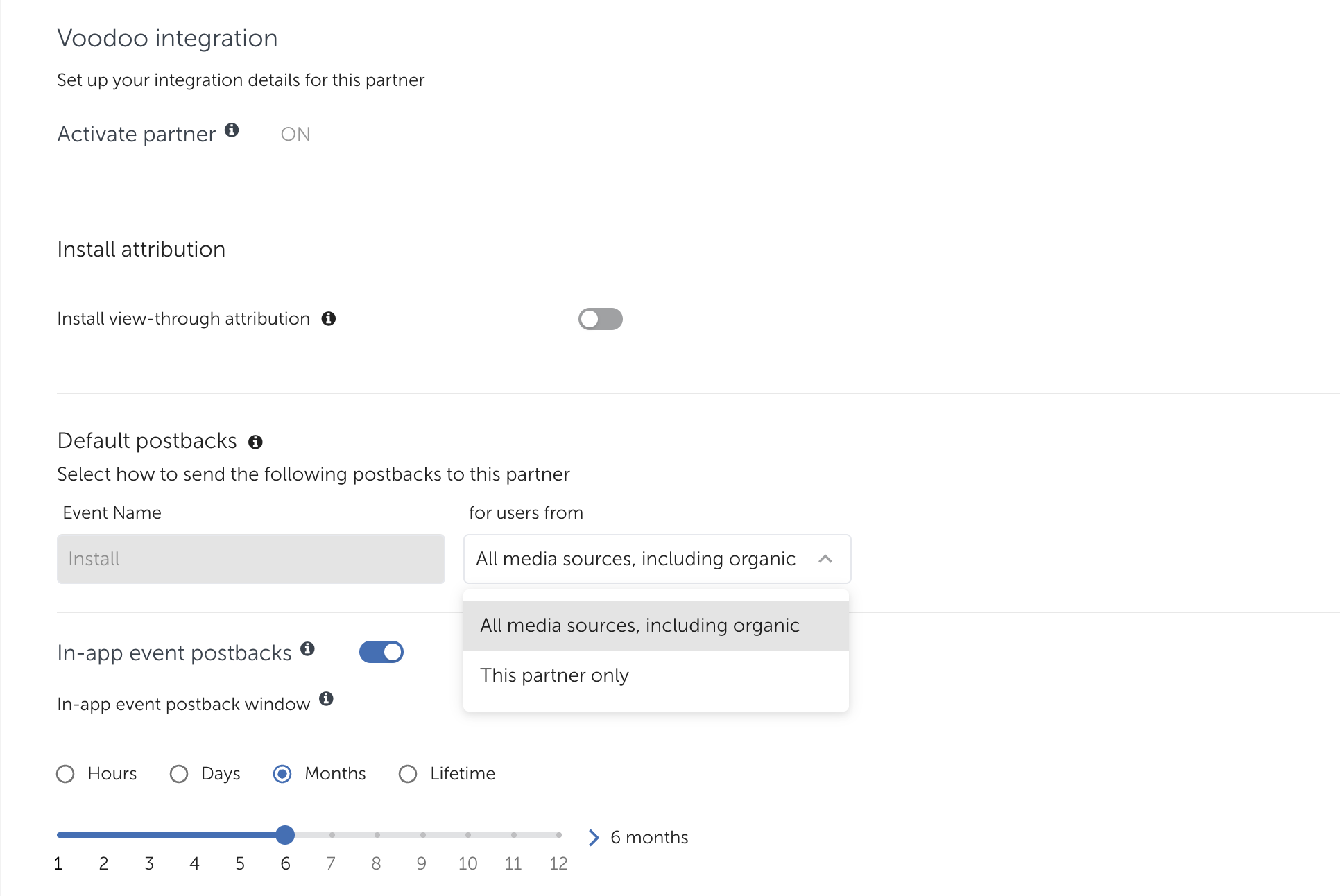
Navigate to **Integration** and enable **All media sources, including organic**.
This setting ensures the campaign model is trained on complete data, allows existing users to be excluded from targeting, and enables more accurate optimization and performance from day one.
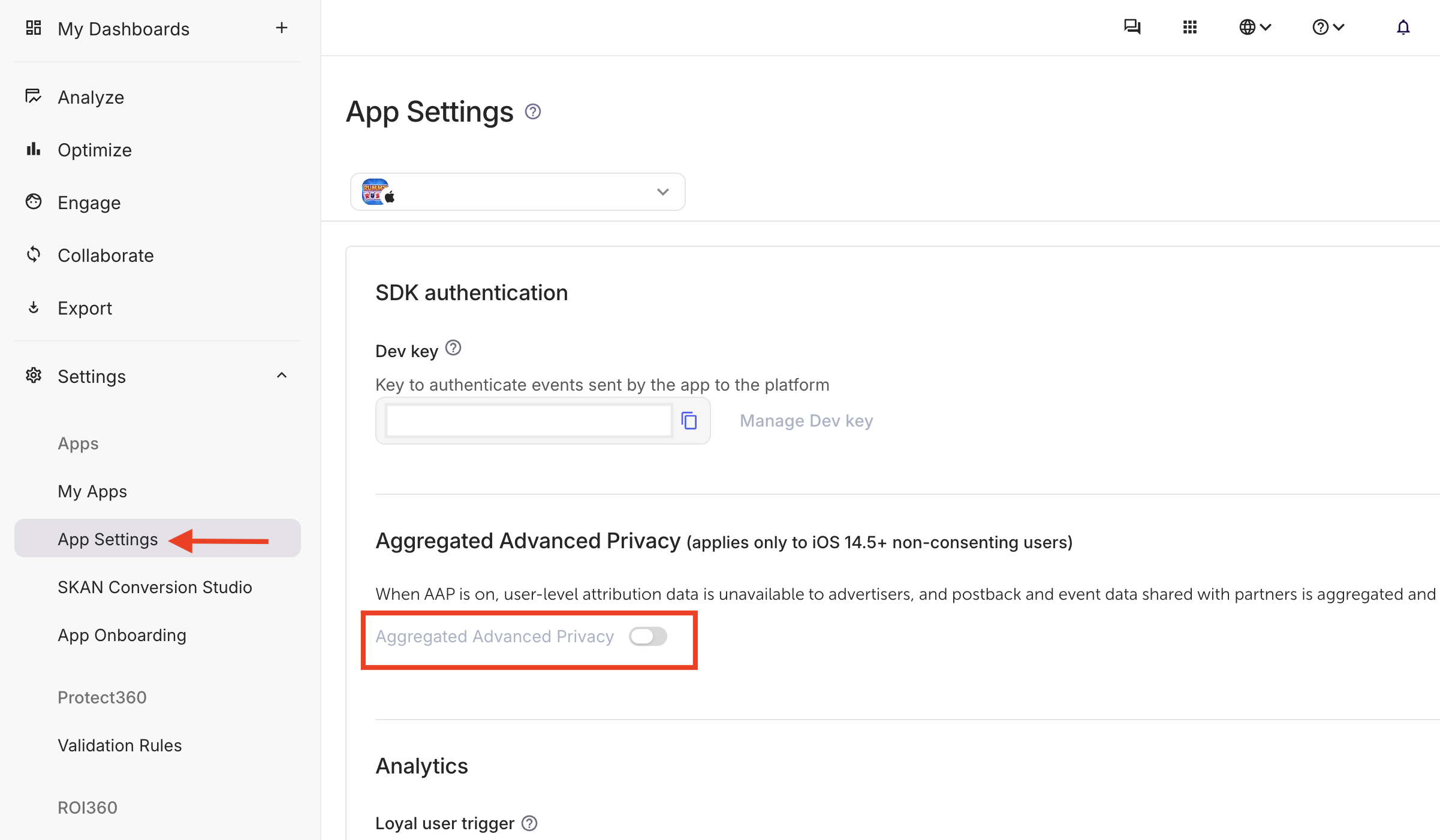
## Ensure “Aggregated Advanced Privacy” is disabled
This setting must be disabled to allow access to user-level attribution and event data. When **Aggregated Advanced Privacy** is enabled, AppsFlyer aggregates and anonymizes postbacks, which limits data granularity and negatively impacts campaign optimization and performance analysis.
## Configure relevant in-app event postbacks
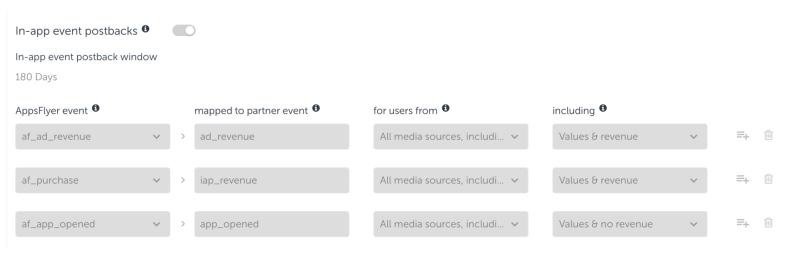
Enable **in-app event postbacks** and set the postback window to **Lifetime**.
Add your ad revenue and in-app purchase events (if applicable) and map them to **ad\_revenue** and **iap\_revenue** respectively (see below).
In the **Including** column, select **Values & revenue** to ensure revenue data is shared correctly.
## Locate the app identifier from the AppsFlyer tracking URL
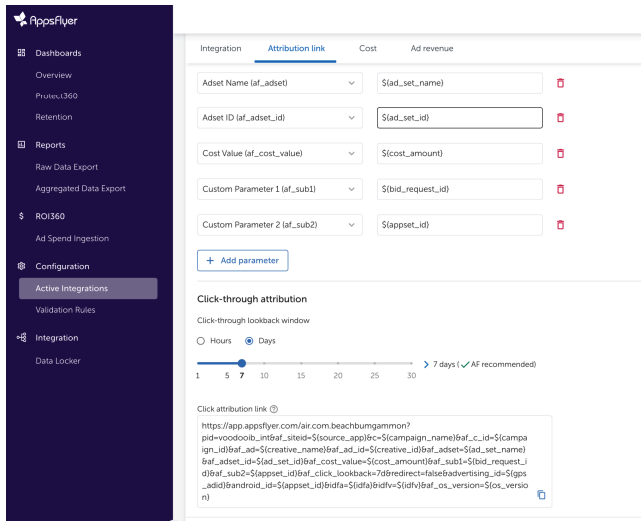
Once the integration is complete, AppsFlyer generates a tracking URL for your app.
The **App Identifier** is the value that appears immediately after `app.appsflyer.com/` in the URL.
* For **iOS**, this is the numeric part of the App Store ID (for example: `123456789`).
* For **Android**, this is the app’s package name (for example: `com.example.app`).
Example:
`https://app.appsflyer.com/`**`123456789`**`?...`
`https://app.appsflyer.com/`**`com.example.app`**`?...`
{% hint style="info" %}
Please enter this value in your [app’s tracking settings](/user-acquisition/add-your-application.md).
Helix will create an up-to-date version of the tracking URL using this identifier.
{% endhint %}
---
# Agent Instructions
This documentation is published with GitBook. GitBook is the documentation platform designed so that both humans and AI agents can read, navigate, and reason over technical content effectively. Learn more at gitbook.com.
## Querying This Documentation
If you need additional information that is not directly available in this page, you can query the documentation dynamically by asking a question.
Perform an HTTP GET request on the current page URL with the `ask` query parameter, and the optional `goal` query parameter:
```
GET https://docs.helix.voodoo.io/user-acquisition/integrate-your-mmp/appsflyer-integration.md?ask=&goal=
```
`ask` is the immediate question: it should be specific, self-contained, and written in natural language.
`goal` is optional and describes the broader end goal you are ultimately trying to accomplish on behalf of the user. GitBook uses it to tailor the answer towards what is most useful for that goal.
The response will contain a direct answer to the question and relevant excerpts and sources from the documentation.
Use this mechanism when the answer is not explicitly present in the current page, you need clarification or additional context, or you want to retrieve related documentation sections.